Almost every network problem we are called about was designed in years earlier. The dead spot in the corner office, the switch stack that takes a building down when it reboots, the firewall rule nobody dares touch — none of these are faults exactly. They are decisions, made quickly, that nobody expected to still be load-bearing a decade later.
Good network design is mostly unglamorous. It does not announce itself, because the sign of it working is that nothing happens. This post sets out the principles that have held up over twenty years of designing, installing and supporting enterprise networks — and is honest about which parts of the industry’s own advice have aged, and which have not.
Start with the principles, not the product
Cisco’s own design material sets out six things a LAN deployment should be: easy to deploy, flexible and scalable, secure, easy to manage, resilient, and ready for technology that has not arrived yet. It is a sound list, and the useful thing about it is the order of operations it implies. Those are requirements. The equipment is an answer to them, and it comes second.
Most poor designs we see got this backwards: a platform was chosen first — because of a renewal date, a quote, or what the last engineer knew — and the design was then bent to fit it. That is also how organisations end up with a network nobody can explain.
Hierarchy: boring, old, and still right
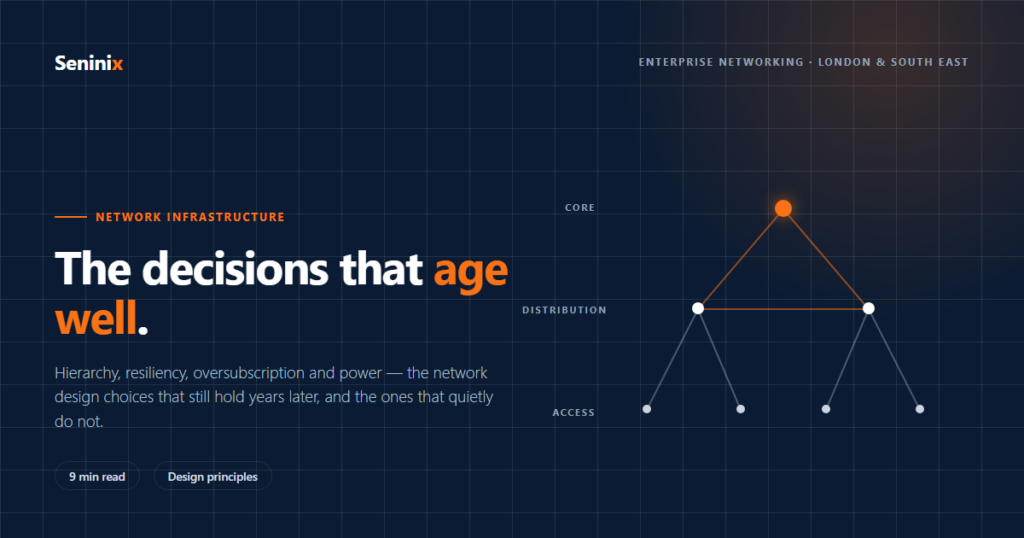
The three-layer model — access, distribution, core — is roughly as old as enterprise networking, and it is still the foundation. Access is where devices and people connect. Distribution aggregates the access layer for a building or an area and is the boundary between Layer 2 and Layer 3. Core aggregates the distribution layers, and does as little else as possible.
Cisco’s material puts it bluntly: without a rock solid foundation, the rest doesn’t matter. What hierarchy buys you is not elegance, it is small fault domains. Each layer has one job, each building block is understandable on its own, and when something breaks, the blast radius has edges. A flat network has none of that. It works beautifully until the day it fails everywhere at once, and it is miserable to troubleshoot in between.
This scales down as well as up. A fifty-person office does not need three physical tiers — the core and distribution functions usually collapse into one pair of switches. The thinking still applies: know which box does which job, and keep the failure of one from becoming the failure of all.
Simplify the middle
The distribution layer is where complexity used to accumulate: spanning tree keeping loops at bay, a first hop redundancy protocol handing default gateways back and forth, and two boxes to configure in step. Every one of those is a thing that can be configured inconsistently at two in the morning.
The modern answer is to make two physical switches behave as one logical switch — StackWise Virtual and Virtual Switching System on Cisco, with equivalents from other vendors. Cisco’s design guidance describes the benefits as eliminating spanning tree, first hop redundancy and multiple points of management; recovering in under a second through stateful switchover; and using both uplinks at once rather than leaving one idle. In practice the biggest win is the one that does not appear on a datasheet: there is less to get wrong.
Do you need a core at all?
This is a question of scale, complexity and convergence rather than taste, and it has an arithmetic answer. Connect your distribution blocks directly to each other and the links multiply as you grow: by the fourth building block you are maintaining 24 links and eight routing neighbours. Put a dedicated core in the middle and the same estate needs 16 links and three neighbours, and adding the fifth block is a known, small piece of work rather than a redesign.
Below a certain size, a core is cost you do not need. Above it, the absence of one shows up as fragile convergence and a cabling diagram nobody wants to maintain. The honest answer for most organisations of fifty to five hundred people in one or two buildings is that they do not need a separate core — and anyone insisting otherwise should be asked to show the link maths.
Oversubscription: the number nobody checks
Every access switch has more capacity facing the desks than it has facing the rest of the network, and that ratio is a design decision whether or not anyone makes it deliberately. Cisco’s guidance gives typical figures of 20:1 from access to distribution and 4:1 from distribution to core.
Treat those as a starting point to be argued with, not a rule. A floor of forty-eight gigabit ports with a single gigabit uplink is 48:1, and it will be fine right up until the morning everyone restores from the cloud at once. The question worth asking of any proposed design is simply: what is the oversubscription at each tier, and what did you assume people would be doing? If nobody can answer, the number was never chosen.
Power is part of the network now
Access points, cameras, door controllers, room panels, displays and increasingly lighting all draw power from the same cable that carries their data. That makes the power budget a design input rather than an afterthought. The standards have climbed steadily: 15 watts with 802.3af, 30 watts with 802.3at, 60 watts with Cisco’s UPOE, and 90 watts with UPOE+ and 802.3bt, which added four new classes of device.
Two practical consequences. First, a switch’s PoE budget is finite and shared — populating every port with a 30-watt device is a different purchase from populating it with phones. Second, multigigabit ethernet delivers 2.5 and 5 Gbps up to 100 metres over existing Cat5e and Cat6, which means a wireless upgrade does not automatically mean recabling. Whether that applies to your building is a question your structured cabling test results can answer, if anyone kept them.
Design security in, at the access layer
The access layer is where devices meet the network, which makes it the policy enforcement point — the place where identity is established and where a device is put somewhere appropriate rather than simply let in. Segmentation is the practical expression of this: one physical network carrying multiple virtual ones, so that the building management system, the guest WiFi and the finance team are not neighbours.
This is much cheaper to design than to retrofit. Adding segmentation to a flat network that has been in production for eight years means discovering, one outage at a time, what was quietly depending on being able to reach everything else.
Design for the people who will run it
A design that only its author can operate is not finished. The test is whether an engineer who has never seen the site can work out what is going on from the documentation, the labelling and the naming — because one day that is exactly what will happen, at the worst possible moment.
The same logic applies to monitoring. Resilient hardware fails over quietly, which is a virtue until the second failure arrives and nobody noticed the first. A redundant pair running on one half for three months is not resilient; it is a single point of failure that has not been told yet. Someone has to be watching, and that belongs in the design rather than being bolted on after go-live.
What has aged, and what has not
Worth being honest about this, because it is the whole point. The Cisco material quoted above is a pre-sales deck from April 2020, and some of it has dated in exactly the ways design documents do.
- The names have moved. The deck’s management platform, Cisco DNA Center, is now Cisco Catalyst Center. Across the industry, vManage became SD-WAN Manager, vBond became Validator, vSmart became Controller, and Aruba Central became HPE Aruba Networking Central. If a proposal you are reading still uses the old names, it was written from an old template.
- The forecasts did not survive. The deck leads with fifty billion connected devices by 2025. That year has been and gone and the number did not arrive. Design to measured load on your own estate, not to a vendor’s projection.
- The availability arms race got silly. One slide offers ten nines of availability. Nobody can evidence that, and chasing it in a single building is a waste. Four nines, designed properly and actually monitored, is worth more than a number on a slide.
- The principles did not move at all. Hierarchy, small fault domains, simplified distribution, sensible oversubscription, policy at the edge. Six years on, with different products and a lot more wireless, every one of those still holds.
That is the real lesson for anyone commissioning a network. Principles age slowly, product recommendations age fast. A design that leads with architecture will still make sense when the hardware is replaced; one that leads with a model number is obsolete the moment the vendor refreshes the range.
On cost, honestly
Design discussions often stall on budget, and the industry’s usual move is to quote the cost of downtime. The Cisco deck does it too, putting an hour of downtime at over $300,000 for an “average enterprise”, citing industry reports from Gartner and ITIC. Treat that as directional rather than literal: it is six years old, in dollars, and almost certainly not about an organisation of your size.
The number that matters is yours. What does an hour cost you — in people unable to work, orders not taken, clinics not running? Most organisations have never worked it out, and it is usually either much smaller or much larger than the generic figure suggests. Either answer is useful, because resilience is a dial, not a switch, and you should know what you are buying.
Questions worth asking of any network design
- What is the oversubscription ratio at each tier, and what usage was assumed?
- What fails if this single box fails — and how will anyone know it has?
- Which devices share a segment with which others, and why?
- What is the PoE budget, and what happens when every port is populated?
- Does the wireless design come from a measured survey or from an access point count per square metre?
- Can an engineer who has never seen the site navigate it from the documentation?
- What in this design is driven by a requirement, and what by a product that was going to be bought anyway?
If a supplier cannot answer those without reaching for a brochure, that tells you something useful.
Where this starts
Most of the decisions above are cheap when a network is being designed and expensive once it is in the ceiling. That is why they belong at the start of a project — an office move or a refurbishment is the natural moment, because the walls are open and nothing has been committed yet.
If you have an existing network and no documentation for it, the starting point is finding out what is actually there — which is a different exercise from reading the design that was drawn before it was built. The two are rarely the same, and the gap is usually where the problems live.
Related reading: Coverage or capacity: which problem does your WiFi actually have?
Seninix designs, installs and supports business networks across London and the South East. The Cisco material referenced here is a pre-sales deck dated 16 April 2020 and is quoted as a source, not as current vendor guidance; Cisco’s own validated designs are published at cisco.com/go/cvd. Free review terms apply: seninix.com/terms.